🧭
Ch 1-3Foundations
Purpose and scope, the tiered support model, and how intake, triage, and update cadence set the tone for everything that follows.
An Enterprise IT Helpdesk Field Manual, Tier 1 to Tier 3
This is a full field manual for IT service desk work, not a summary of one. It covers first-contact intake, email and phone scripts, escalation between tiers, major incident communication, ServiceNow record-keeping, and the quality checks that separate a good support professional from an average one. Written for someone just starting on a service desk, and for anyone thinking about walking through that door. Read it here in tabs by chapter, or download the full PDF and EPUB below to keep.

Everything in the tabs below, plus every template and figure, in one file you can print or load on an e-reader. Free, no signup.
I wrote this for two kinds of people. The first is someone who just started on a service desk and wants to be good at it quickly, without learning every lesson the hard way. The second is a friend who is thinking about getting into IT and does not know where the door is. This is the door. Almost everyone I respect in this industry walked through it. You do not need a background in technology to read this. Every term is explained the first time it appears. What you do need is the willingness to take responsibility for someone else's bad morning, which turns out to be most of the job.
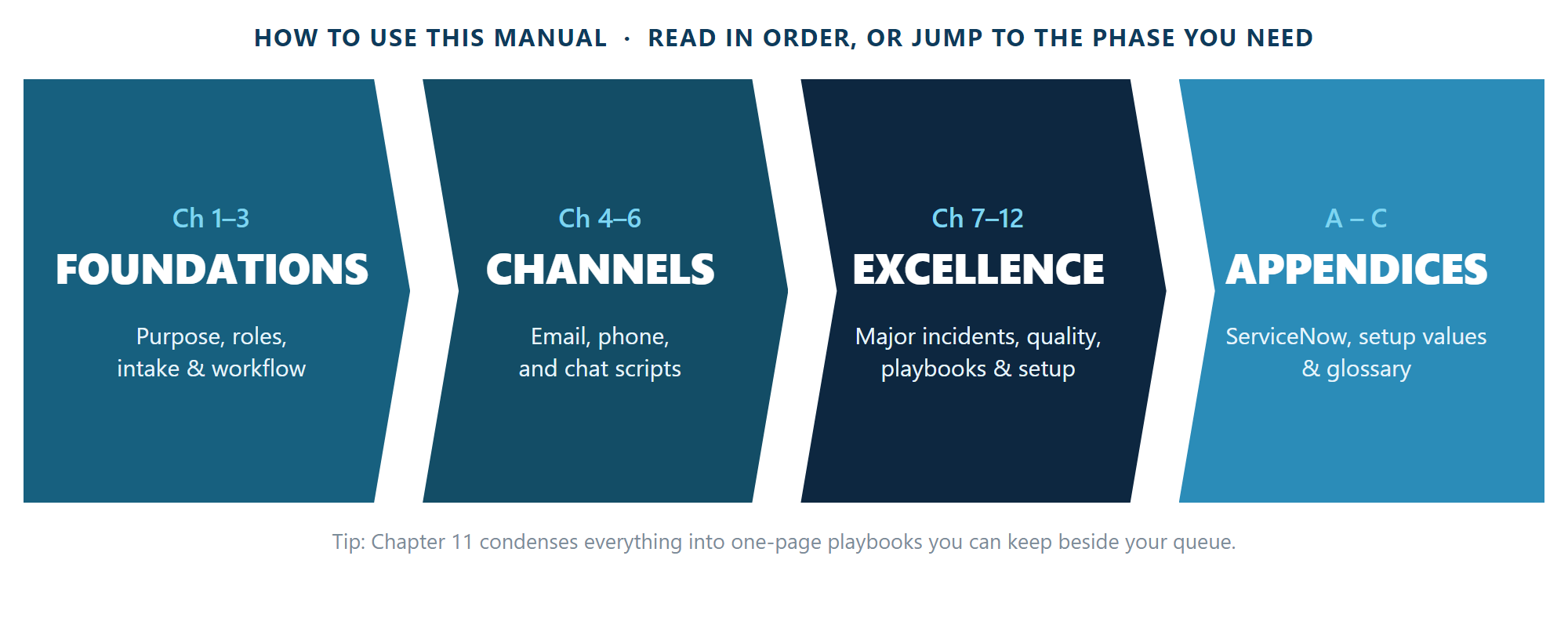
Figure 1.1: The manual roadmap, four phases, twelve chapters, three appendices.
Read chapters 1 to 3 straight through. They are short, and everything after them assumes
you have. After that, use it the way you would use any field manual: go to the chapter
that matches what you are about to do, take the template, and adapt it. Text in square
brackets is a blank you fill in, for example [INC0000000] becomes a real
incident number. Remove every unused bracket before you send anything. The ServiceNow
material is in the appendices; if your organization uses a different ticketing system,
the principles in the main chapters still apply, only the field names change.
Purpose and scope, the tiered support model, and how intake, triage, and update cadence set the tone for everything that follows.
Full email template library, phone call flow and scripts, and messaging and chat standards for every situation a desk handles.
Major incidents, specialized scenarios, plain-language writing, quality assurance and metrics, quick-reference playbooks, and rolling this manual out locally.
Record templates, escalation and closure workflows for ServiceNow specifically, the values to fill in once, and a full glossary.
Chapters 1 through 3. Get this part right and the rest of the process works. Get it wrong and a simple request spends three days in a troubleshooting queue while the customer waits.
I spent my first months on a desk thinking the goal was to close tickets fast. The numbers looked good. Then a manager showed me three tickets I had closed that same week, all the same customer, all the same underlying issue. I had been fast three times instead of right once.
The goal is to restore service, fast. Most of this manual is written for incidents.
Access, a mailbox, a replacement device. The goal is to fulfil it correctly, not troubleshoot it.
Tier 1 is not expected to solve problems, but is best placed to notice one, since repeats show up there first.
Changes follow their own approval process. When a change causes an incident, say so in the record: that link is often the fastest route to a fix.
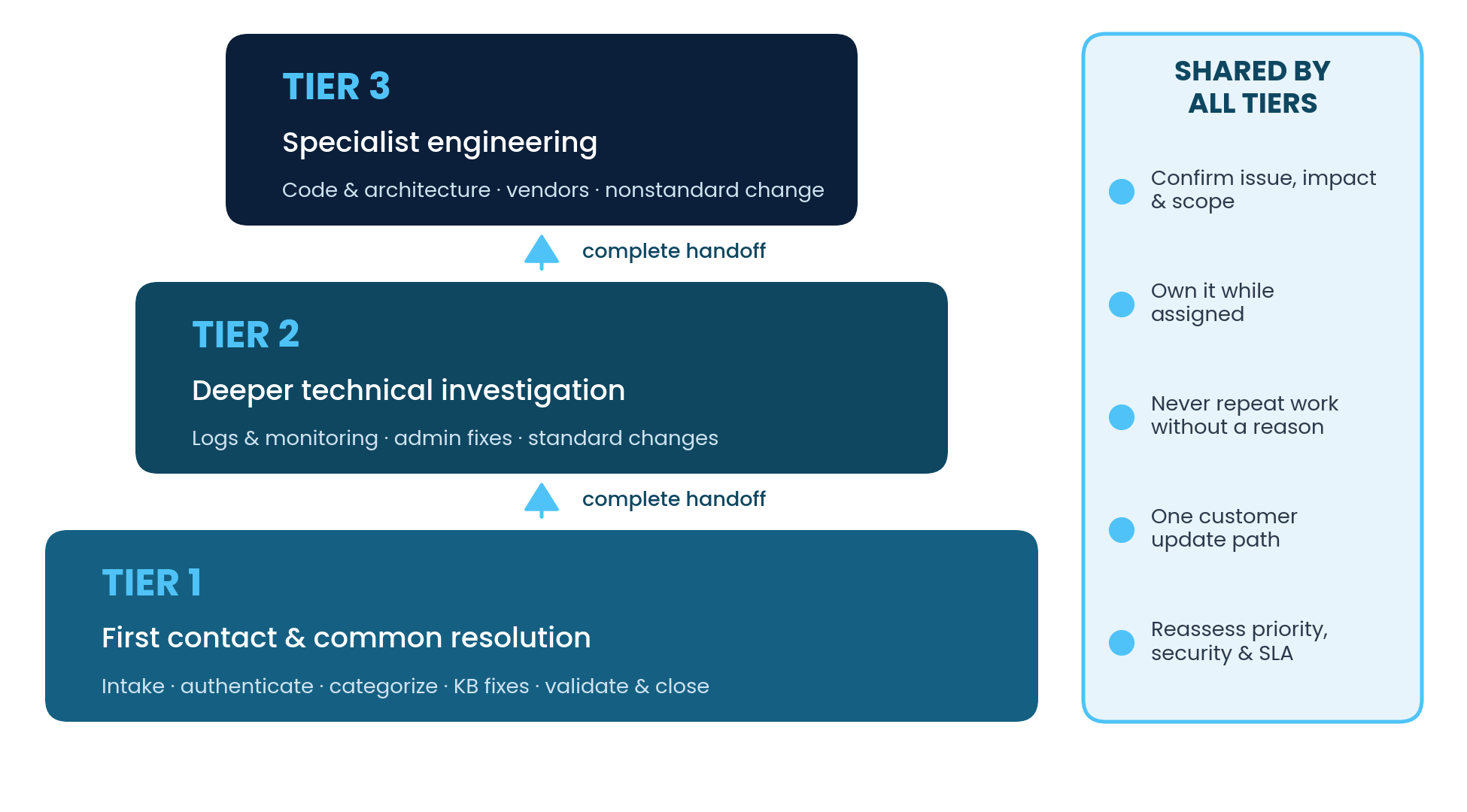
Figure 2.1: The tiered support ladder and the responsibilities every tier shares.
| Tier 1 | Tier 2 | Tier 3 | |
|---|---|---|---|
| Primary focus | First contact, intake, common low-risk resolution | Deeper endpoint, application, network, identity troubleshooting | Specialist analysis, engineering, vendors, complex remediation |
| Typical actions | Authenticate, categorize, apply approved KB articles, validate and close | Review logs and monitoring, apply admin fixes and standard changes | Code and architecture analysis, nonstandard change, cross-team coordination |
| Escalate when | KB fails, admin access needed, recurring or multi-user impact, SLA risk | Advanced diagnostics, suspected defect, high-risk change, hypotheses exhausted | Returns to a lower tier only with a clear reason and executable instructions |
| Hands off with | Symptoms, errors, timeline, impact, actions, results, evidence | Tested hypotheses, evidence locations, reproduction steps, rollback notes | Evidence, decisions, timestamps, validation, follow-up actions |
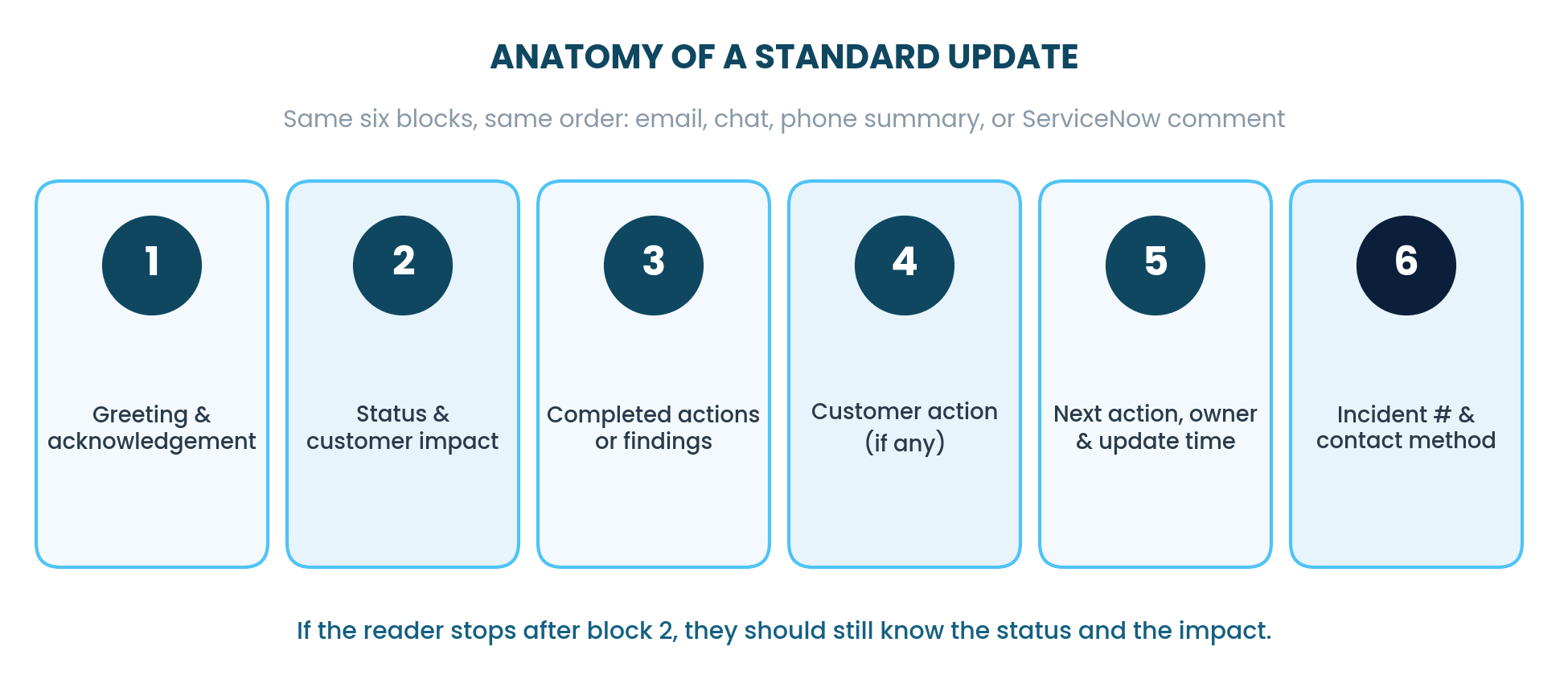
Figure 2.2: The six building blocks of every standard update.
Collect the minimum intake data before troubleshooting deeply: customer and contact details, the affected service or configuration item, exact symptom and error text, start time and last known working time, scope and business impact, and recent changes or attempted fixes. "Last known working time" is the line people skip most, and it is often the most valuable one in the record. Priority is impact combined with urgency, assessed against the approved matrix, never raised just because a customer asks for it.
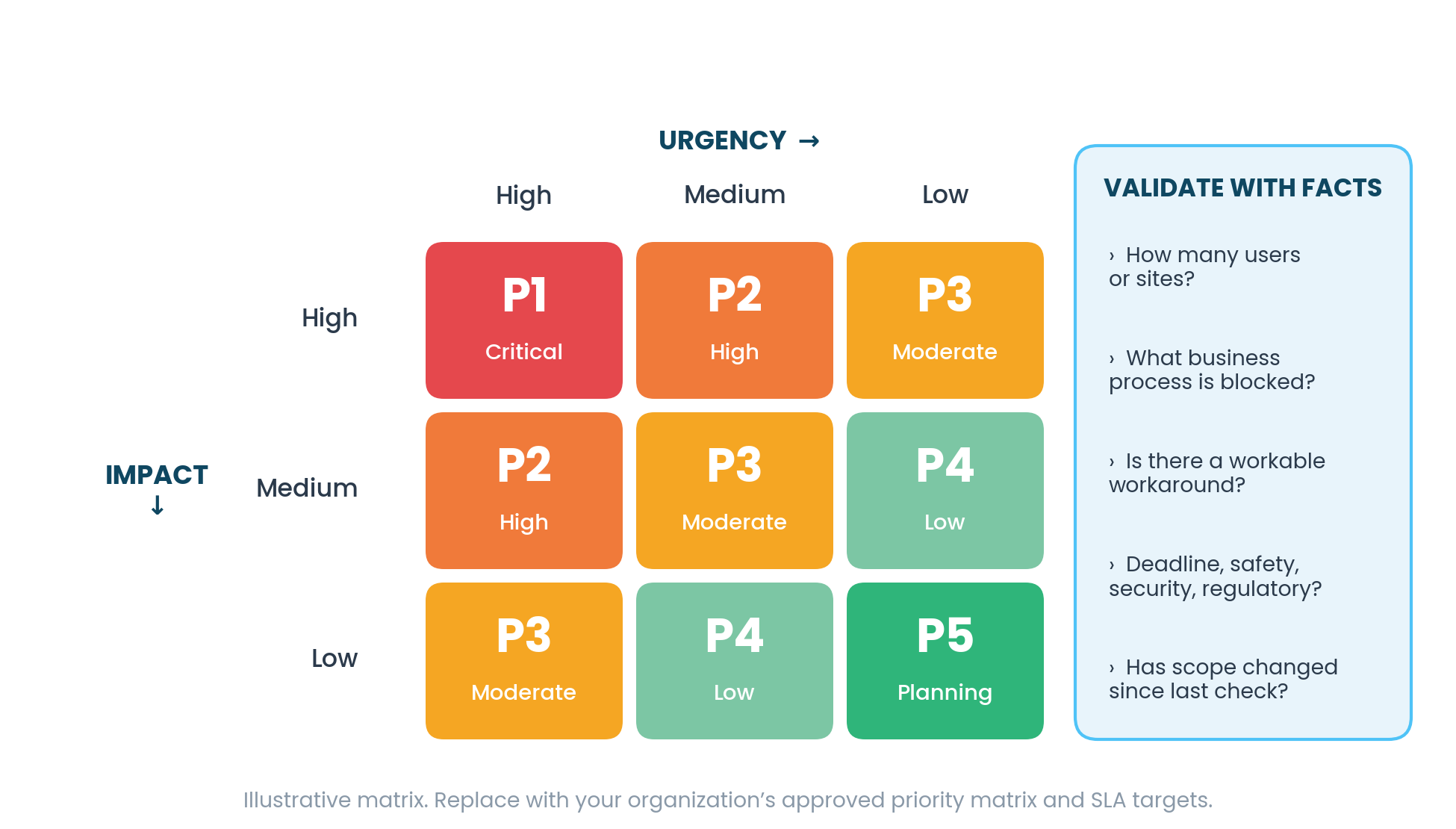
Figure 3.1: Sample impact-by-urgency matrix with the facts that justify a priority.
Chapter 4. Email is where most of the desk's reputation is built, because the customer cannot ask a follow-up question and get an answer in the same minute. Say what is known, what is needed, and what happens next.
| Situation | Template | Must include |
|---|---|---|
| Common, low-risk issue with a current KB article | Self-Service Guidance | Specific resources, path back to assisted support, next response target |
| Ticket just submitted | Automated Ticket Receipt | Incident number, received time, expected initial response, support hours |
| Needs specialist work | Tier Escalation Notice | New owner, status, impact, workaround, next update time |
| A promised milestone will be missed | Delayed Investigation | What changed, what is active, revised commitment |
| Fix applied, customer must act | Resolution and Customer Action | What was done, what the customer confirms, fallback |
| Incident closed | Closure | Issue, cause, resolution, validation, prevention |
Hello [Name],

I have taken ownership of incident [INC0000000] regarding [one-sentence issue]. I understand the current impact is [business impact and affected scope].

I am reviewing [logs/configuration/recent changes] and will next [specific action]. If available, please send [specific missing information] using [approved secure method]. Please do not send passwords or authentication codes.

I will provide the next update by [date, time, time zone], even if the investigation is still in progress.
Hello [Name],

Status: [Investigating / Mitigated / Monitoring / Awaiting vendor].
Impact: [unchanged or revised impact].

Since the last update, we [completed actions]. We confirmed [facts] and ruled out [items]. Our current working theory is [hypothesis], which is not yet confirmed.

Next, [owner/team] will [action]. The next update will be provided by [date/time/time zone].
Hello [Name],

We completed [resolution action] at [date/time/time zone]. We validated [technical checks], and the service is currently [available/performing normally].

Please confirm whether you can now [customer validation step]. If the problem returns, reply with the time, action attempted, and any visible error.
Issue: [concise symptom]
Cause: [confirmed cause or "not conclusively determined"]
Resolution: [action taken]
Validation: [evidence/customer confirmation]
Prevention/follow-up: [problem/change/knowledge record or none]
Chapters 5 and 6. The phone is the only channel where the customer hears whether you are calm. Everything else can be edited before it is sent, on a call your tone is the product.
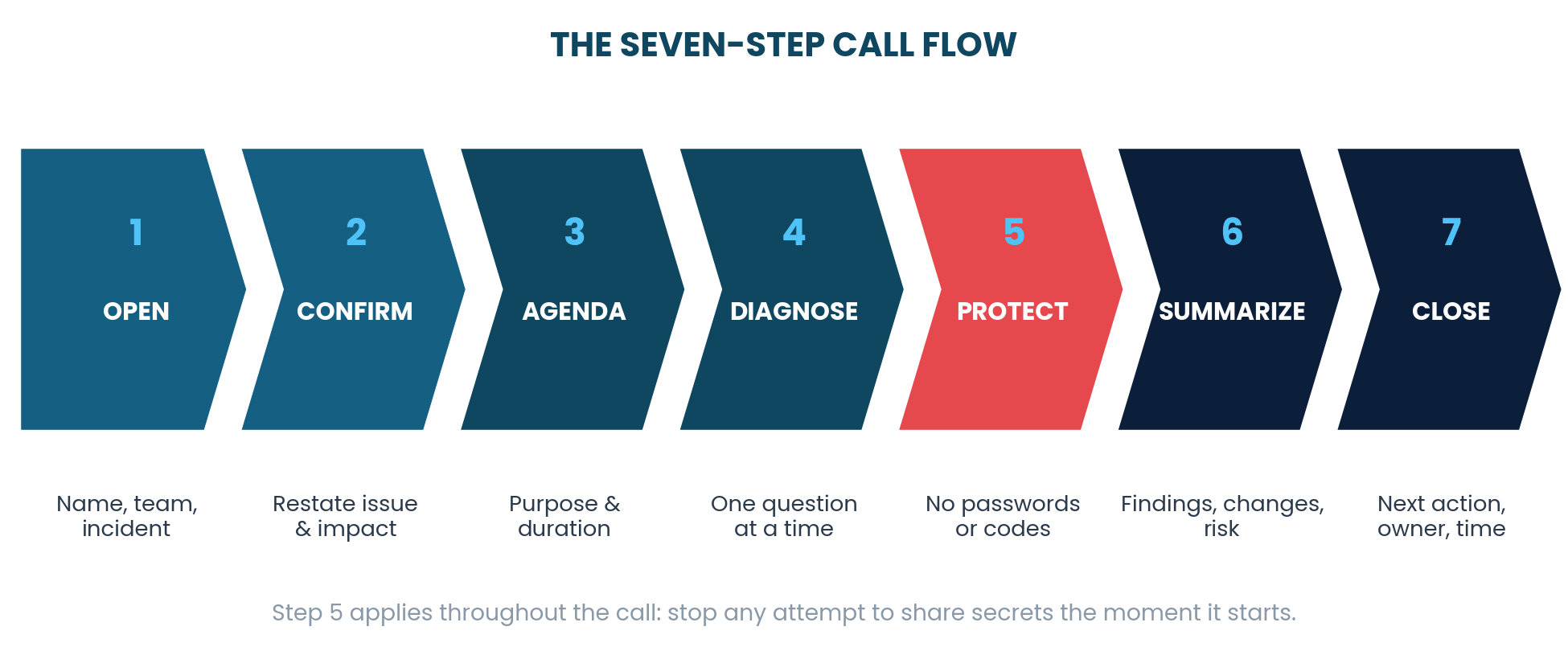
Figure 5.1: Open, confirm, set the agenda, diagnose, protect, summarize, close.
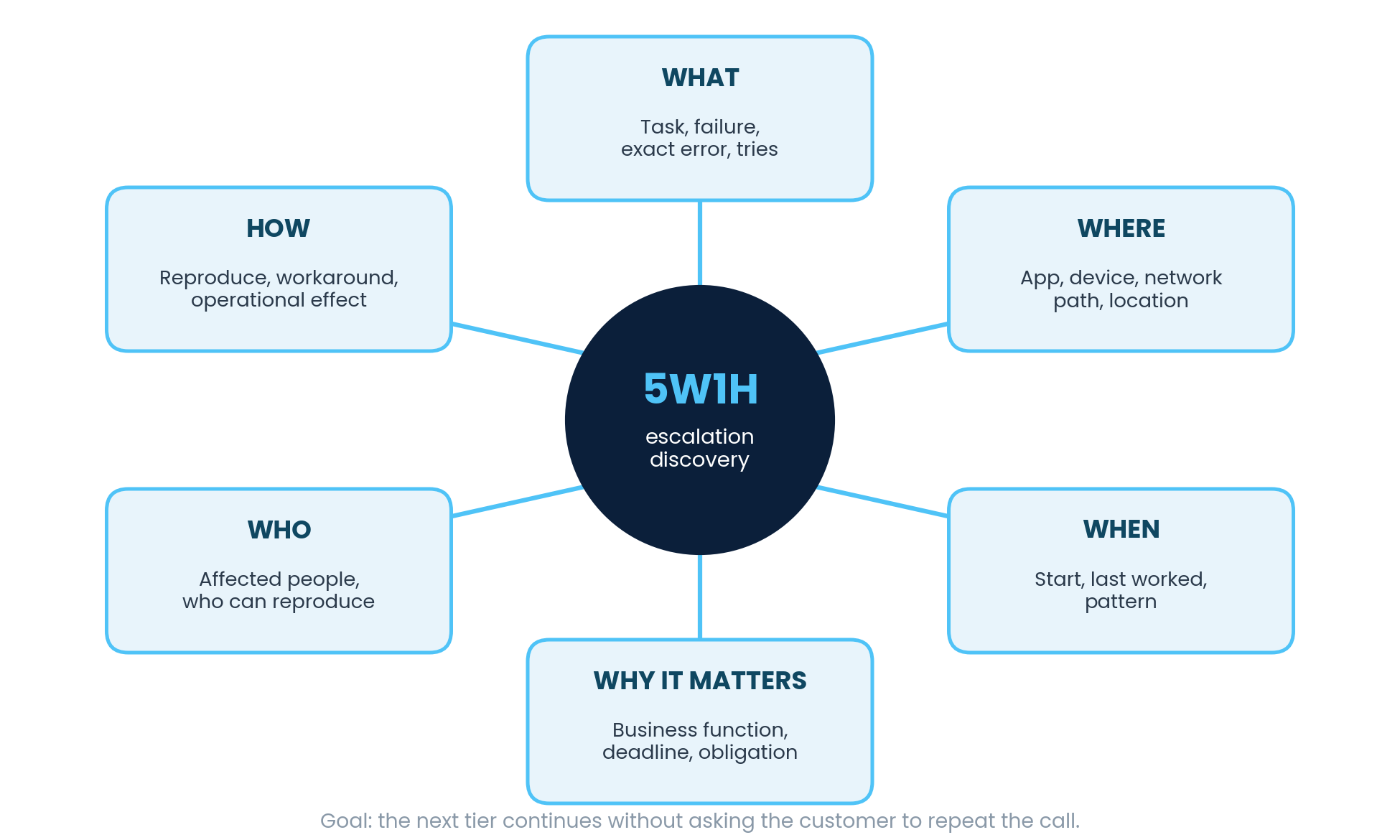
Figure 5.2: The 5W1H escalation-discovery wheel: what, where, when, why it matters, who, how.
"Hello [Name], this is [Your name] with IT Support. Are you contacting us about a new issue or incident [INC0000000]? I understand that [known symptom] is affecting [known service or device]. I will confirm a few details, review what has already been tried, and then either work through the approved first-contact steps with you or route the incident with a complete technical summary."
"I have completed the approved first-contact checks, but this issue requires [advanced access/specialized analysis/a resolver group]. I will escalate incident [INC0000000] to [Tier 2/Tier 3/group]. I am including the symptoms, business impact, timeline, steps completed, results, and the best way to reach you so the next specialist can continue without asking you to start over."
"The next step may [restart the device/end the session/cause a brief interruption]. The expected impact is [impact] for about [duration]. Is it safe to proceed now? Please save your work first."
| Channel | Best for | Switch away when |
|---|---|---|
| Formal updates, templates, requests with deadlines, audit trail | A fast back-and-forth is needed | |
| Phone | Complex diagnosis, disruptive actions, difficult conversations | Details must be written down precisely |
| Chat / messaging | Quick checks, short status, scheduling | Troubleshooting becomes complex, disruptive, or sensitive |
| ServiceNow | The authoritative technical record | Never, it is always updated |
Use the script as guardrails, not a recital. Follow the evidence.
Label hypotheses as hypotheses until they are actually confirmed by evidence.
Brief the receiving team before a transfer so the customer never has to repeat the story.
Chapters 7 and 8. In a major incident, the technical work is rarely the bottleneck. The bottleneck is how many people are asking the same question in different channels.
Before I open a single log, I make sure three things have been said out loud: this is known, this person owns it, and the next update comes at this time. Then I go and troubleshoot. The fix does not arrive any later, and several hundred people stop having to ask.
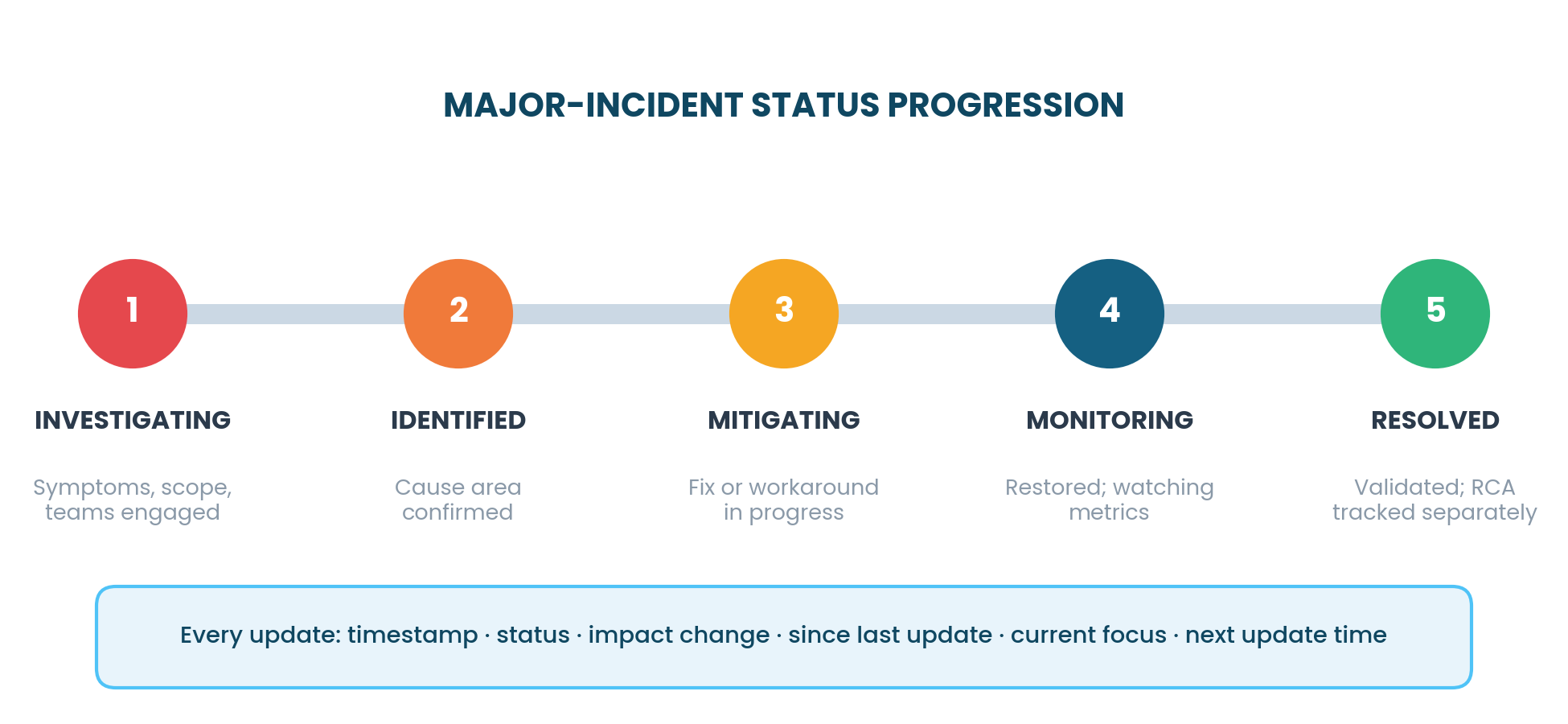
Figure 7.1: Investigating, identified, mitigating, monitoring, resolved, with the fields every update carries.
Timestamp every update and maintain a predictable cadence, even when there is nothing new to report.
Restoration and root-cause completion are two separate milestones, communicated separately.
| If you see | Use | First move |
|---|---|---|
| Work needs a planned session | Scheduled Troubleshooting | Offer time options with time zones and prerequisites |
| Temporary relief is available | Workaround Provided | State limitation, risk, and when to stop using it |
| The issue will not recur on demand | Unable to Reproduce | Ask for specific evidence if it recurs; do not call it resolved |
| Same issue already reported | Duplicate Incident | Link to the master incident and redirect updates |
| Request is not break/fix | Out-of-Scope Request | Route to the correct request or change record |
| Customer refuses a step | Customer Declines | Document reason, alternatives, and agreed next action |
| Phishing, malware, or data exposure | Security-Sensitive | Invoke the security process immediately; preserve evidence |
Chapters 9 and 10. In this job the writing is the work product. The fix lives for a day, the record of it lives for years.
| Avoid | Prefer |
|---|---|
| "User error" | "The current configuration does not support this workflow." |
| "It should work now" | "Our tests passed; please confirm by completing [step]." |
| "We are looking into it" | "We are reviewing [specific evidence] and will update you by [time]." |
| "Nothing is wrong" | "We did not detect a fault during [tests/time window]." |
| "ASAP" | "By [date/time/time zone]." |
Short sentences, active voice, the required action stated before any background detail.
Define acronyms on first use, use descriptive link text, and provide text equivalents for anything visible only in a screenshot.
State confirmed facts and immediate priorities, offer bounded choices, and never argue about emotion, intent, or fault.
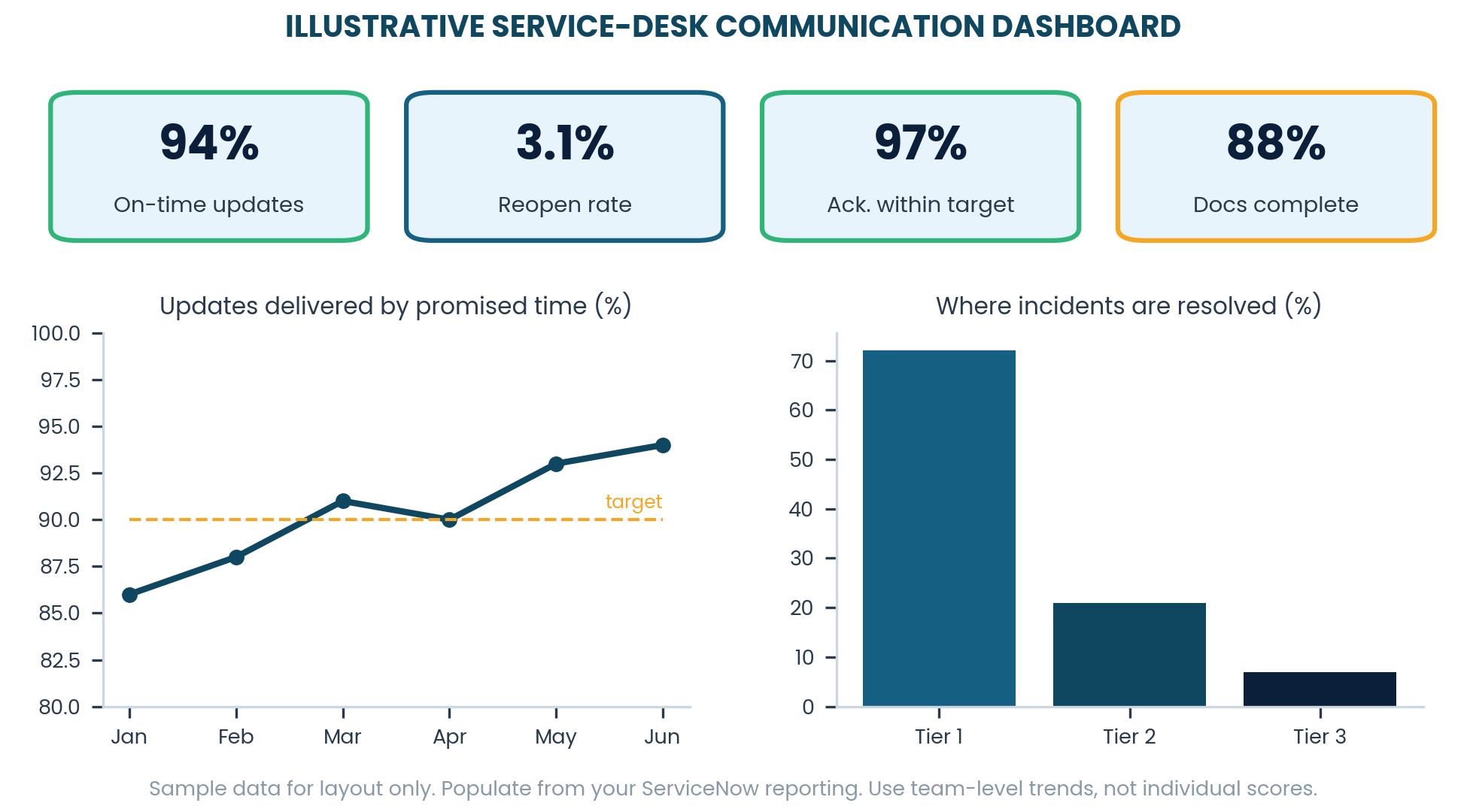
Figure 10.1: KPI tiles, on-time update trend, and incidents resolved by tier.
| Measure | How to calculate | Watch for |
|---|---|---|
| Acknowledgement timeliness | Incidents acknowledged within target ÷ incidents assigned | Auto-replies counted as human acknowledgement |
| On-time updates | Updates sent by promised time ÷ updates promised | Vague promises that are easy to "meet" |
| Reopen rate | Reopened incidents ÷ resolved incidents | Closing before customer validation |
| Handoff quality | Handoffs accepted without clarification ÷ total handoffs | Receiving teams re-asking the customer |
Chapter 11. This is the chapter to print and keep next to the monitor. Everything before it explains the reasoning, this is the part you use while the phone is ringing.
Appendices A and B. Specific to ServiceNow, the ticketing system used where this manual was written. If you use a different platform, the field names differ but the discipline does not: record the same facts, in the same order, with the same honesty about what is confirmed and what is still a theory.
What failed? Who or what was affected? When did it begin? What evidence supports the diagnosis? What was tried? What changed? Who owns the next action? When is the next update? How was restoration validated?
Reported by: [name/contact]
Service/CI: [value]
Issue: [observable symptom and exact error]
Started/last known good: [times]
Scope: [users/devices/sites]
Business impact: [process/deadline/revenue/safety if applicable]
Workaround: [available/not available and limitations]
Initial hypothesis: [clearly labeled hypothesis]
Next action/owner: [action - person/group]
Next customer update: [date/time/time zone]
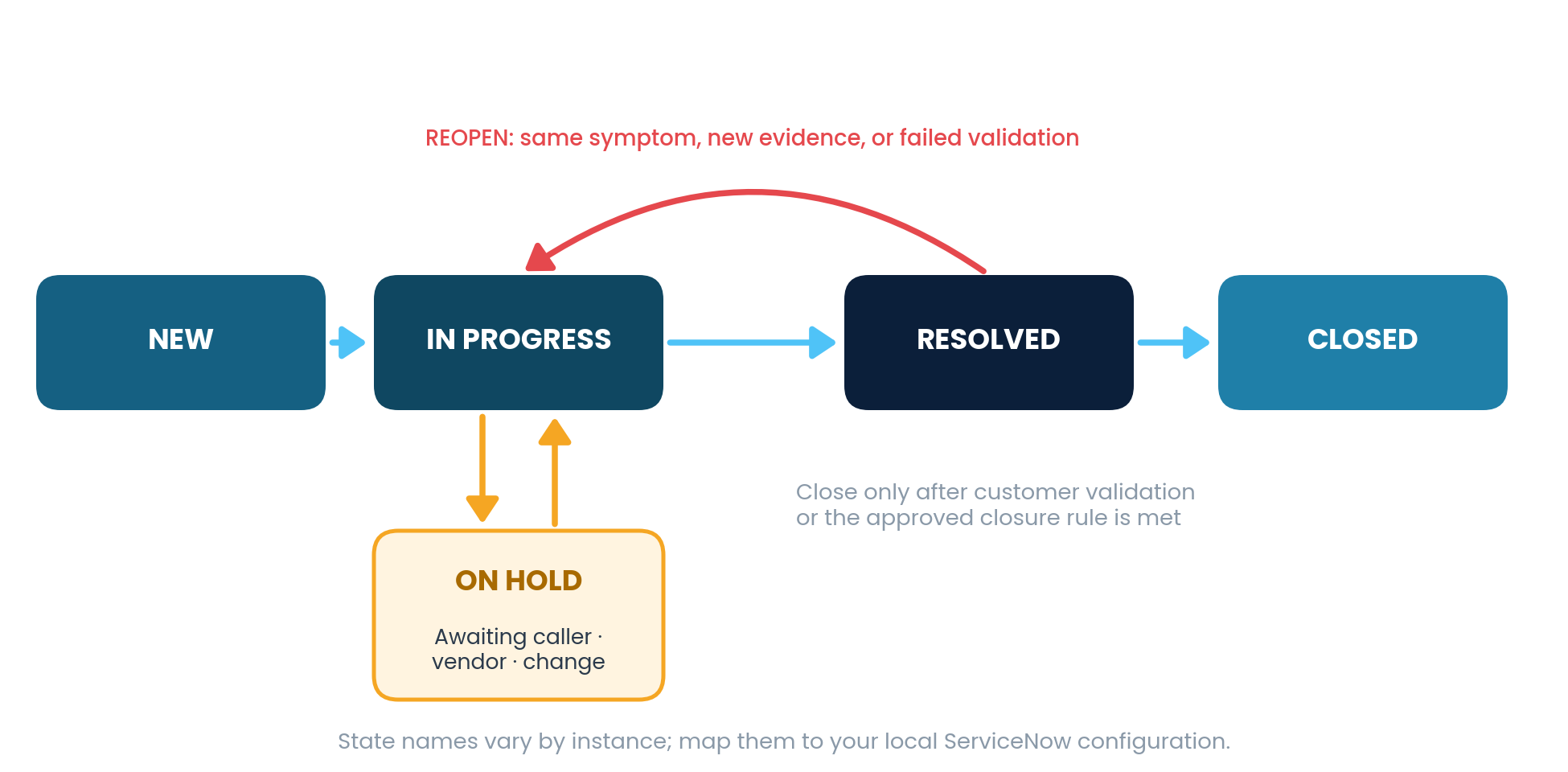
Figure A.1: A typical ServiceNow incident lifecycle, including the reopen path.
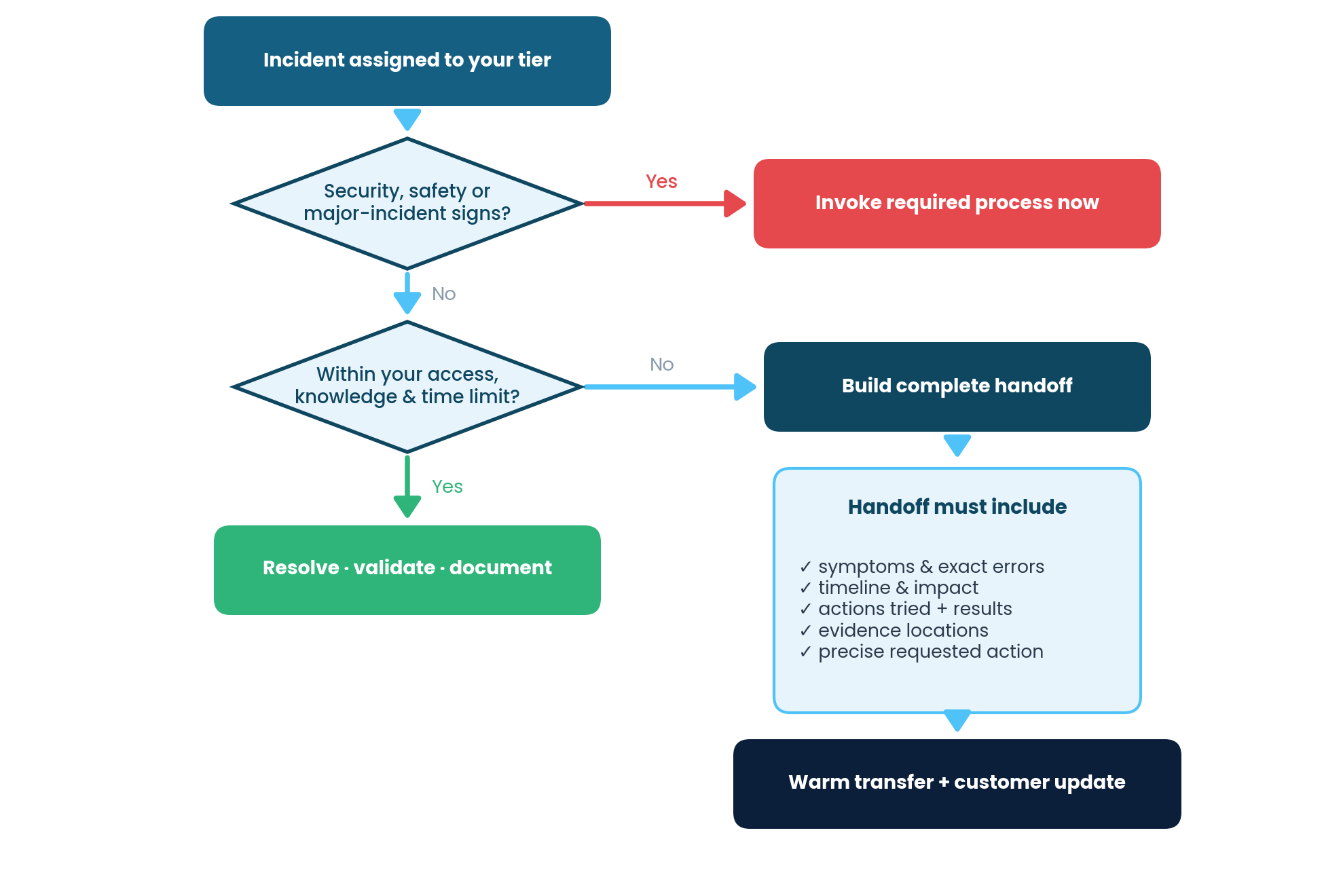
Figure B.1: The escalation decision path, checking security and major-incident signs before every handoff.
| Element | Cold handoff, avoid | Warm handoff, standard |
|---|---|---|
| Request | "Please look at this." | A specific requested action and why your tier cannot complete it |
| Evidence | "See ticket." | Key findings with timestamps and evidence locations |
| Customer | Not told about the transfer | Told who owns it and when the next update arrives |
| Ownership | Reassigned silently | Receiving specialist confirms, named with time |
Chapter 12 and Appendix C. A manual nobody adapted is a manual nobody uses. This is the work that turns this document from something you read into something your desk actually runs on.
Define support hours, time-zone standard, and the after-hours escalation path before anyone sends a template.
States, resolution codes, assignment groups, and mandatory fields all need to match what your ServiceNow instance actually calls them.
Service Desk leadership, ServiceNow administration, Security, and Communications should all sign off before the templates go live.
Run the templates with a small group first, gather feedback from both the support team and customers, and revise before wide rollout.
Every bracketed placeholder in this manual falls into two kinds. One kind you set once, as
an organization, in a single meeting: your SLA targets, support hours, resolver group
names, the approved knowledge portal link, the closure policy. The other kind you fill in
per message, and it needs no preparation: the incident number, the date, the specific
action taken. Before you send anything, search the message for [ and
]. It takes two seconds. A customer who receives an unfilled bracket learns
something about the desk you would rather they did not learn.
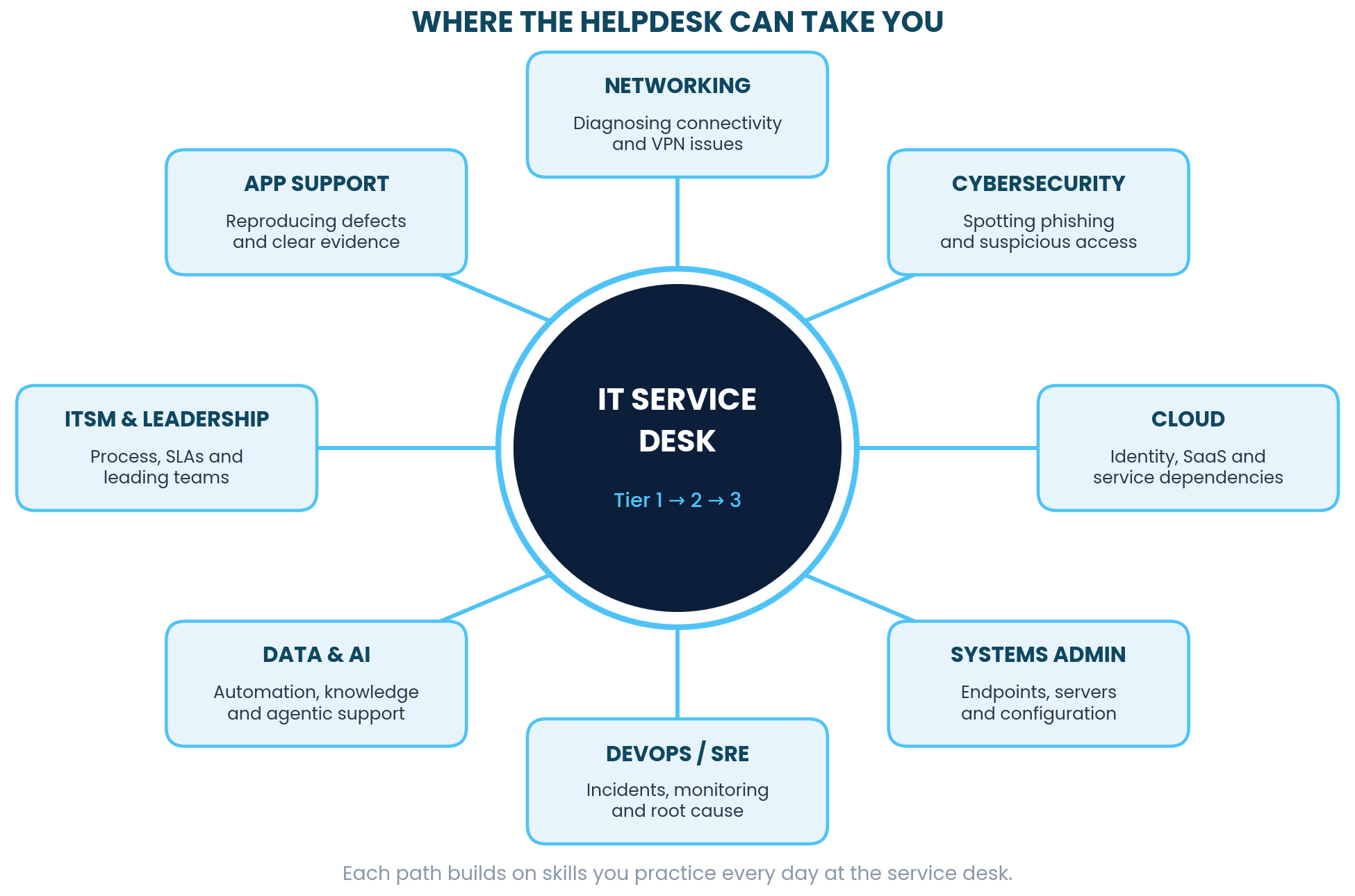
Figure F.1: Structured troubleshooting, clear documentation, and calm communication under pressure are the everyday work of engineers, analysts, architects, and IT leaders.
Plain definitions of the terms this manual uses most, plus the full manual to keep, in PDF or EPUB.
The complete field manual with every template, script, and figure, formatted for printing or reading on any device.
Download PDF ↓The same complete manual in reflowable EPUB format, built for e-readers, tablets, and phones.
Download EPUB ↓Service level agreement: the promise your organization made about how fast it will respond and resolve. A commitment to the customer, and how your work gets measured.
Moving technical responsibility to a tier or team with more access or deeper knowledge. A transfer of work, not a complaint, complete only when the receiving side has what they need.
The package of facts you give the next person: symptoms, errors, timeline, impact, what you tried, what happened, and what you are asking them to do.
An incident with broad or severe impact that triggers its own process, its own communications, and usually its own bridge call.
The confirmed reason something failed. Until it is confirmed, it is a hypothesis, and this manual asks you to label it as one.
How often closed incidents come back. A high reopen rate usually means closure is happening before validation.
Any single thing the organization tracks: a laptop, a server, an application, a network link. Naming the right one is what lets someone find this incident again in six months.
Who, what, when, where, why, and how. The question set that keeps discovery complete when you are under pressure and tempted to skip ahead.