📐
SizingSize compute, memory, and storage per workload profile
Don't size for today's VM count alone; account for HA failover capacity (N+1 at minimum) and headroom for vSAN rebuild traffic after a disk or host failure.
vSphere, vSAN, NSX and Cloud Foundation, phase by phase
A working reference for standing up and running a VMware cluster the right way: sizing and planning before a single host is racked, deploying vSphere and vSAN, wiring up NSX networking and vDefend security, and keeping the whole stack healthy once it's live. Built around the same product family shown in VMware Cloud Infrastructure, organized here by implementation phase instead of by product name, so it reads like a build guide.
Everything that happens before a host is racked decides how smooth the rest of the implementation goes. VMware Cloud Foundation ties compute, storage, networking, and security into one automated stack, but it still needs a real plan behind it: sizing, network segmentation, and a clear picture of how each layer depends on the ones below it.
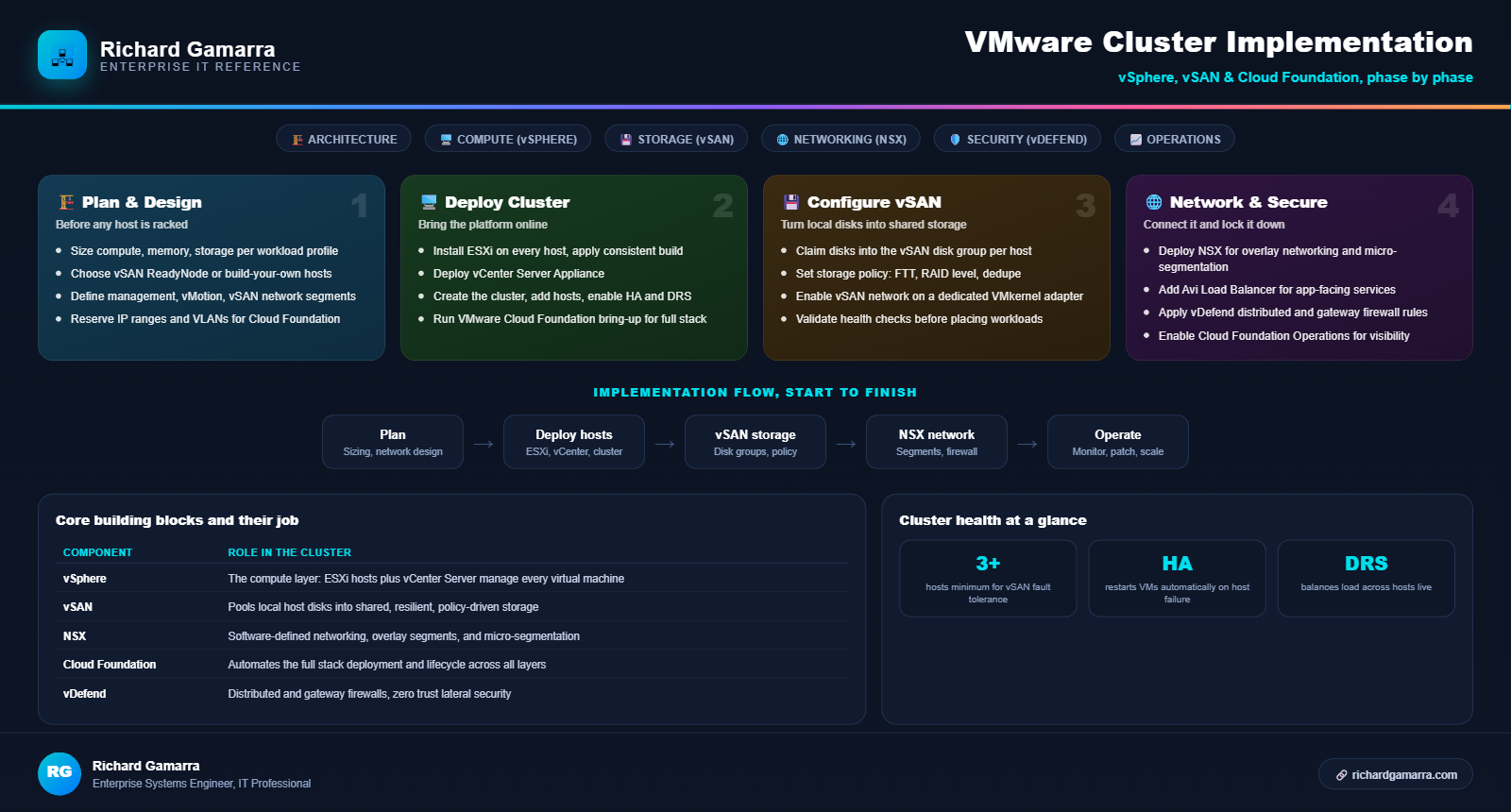
Quick reference: the four implementation phases, the core building blocks, and the minimum cluster health numbers worth remembering at a glance.
Don't size for today's VM count alone; account for HA failover capacity (N+1 at minimum) and headroom for vSAN rebuild traffic after a disk or host failure.
ReadyNodes are pre-validated hardware configurations from VMware's compatibility guide, the safer default unless there's a specific reason to hand-build the hosts.
Each of these traffic types should sit on its own VLAN with its own VMkernel adapter; mixing them on one segment is a common source of vMotion or vSAN performance problems later.
Cloud Foundation's automated bring-up process asks for these ranges up front; having them decided and documented in advance avoids a stalled deployment mid-process.
This is where the cluster actually comes online: ESXi installed on every host, vCenter Server managing them as one logical unit, and the cluster-level features that make a group of hosts behave like a resilient platform instead of a pile of separate servers.
| Step | What happens |
|---|---|
| 1. Install ESXi | Apply the same build and patch level to every host; inconsistent versions across a cluster cause compatibility warnings and can block vMotion |
| 2. Deploy vCenter Server Appliance | The central management plane for the cluster; sized according to how many hosts and VMs it will manage |
| 3. Create the cluster and add hosts | Group ESXi hosts under one cluster object in vCenter, this is what makes HA and DRS possible |
| 4. Enable HA and DRS | High Availability restarts VMs automatically after a host failure; Distributed Resource Scheduler rebalances VM placement live based on load |
| 5. Run Cloud Foundation bring-up | Automates steps 1 through 4 plus vSAN and NSX configuration into one guided workflow for a full SDDC stack |
Monitors host health and automatically restarts affected VMs on a surviving host if one fails. Needs enough unreserved capacity across the cluster to actually absorb a host loss.
Live-migrates VMs between hosts to balance CPU and memory load, and can automate initial VM placement when a new VM powers on.
Two hosts can technically run vSAN with a witness appliance, but three or more real hosts is the standard baseline for fault tolerance without an external witness.
NSX is the software-defined networking layer that replaces or augments physical network configuration with policy defined in software, portable across the cluster and independent of the underlying physical switches.
| Component | Job |
|---|---|
| NSX | Overlay networking, logical switches and routers, and micro-segmentation independent of physical topology |
| Avi Load Balancer | Software-defined load balancing and security for application traffic across VMware Cloud Foundation |
| Container Networking with Antrea | Connects, secures, and manages VMware Kubernetes Service workloads at the network layer |
| Virtual Private Clouds (VPCs) | Self-service private cloud networking through NSX, giving application teams their own isolated network space |
| Cloud Foundation Operations for Networks | Intelligent network operations and app-centric visibility across the whole SDDC |
NSX lets policy follow the workload rather than a physical port, which keeps east-west traffic between VMs restricted to only what's actually needed.
Logical switches and routers exist independent of the physical network underneath, which makes workload mobility across hosts and even sites far simpler.
Cloud Foundation Operations for Networks surfaces which applications are actually consuming network resources, which is far easier to configure before troubleshooting an incident than during one.
vSAN turns each host's local disks into a single pool of shared, resilient storage, no external SAN array required. Getting the storage policy right up front matters more than almost any other single setting in the cluster.
| Step | What it does |
|---|---|
| 1. Claim disks into a disk group | Each host contributes local disks (cache tier plus capacity tier) into vSAN's storage pool |
| 2. Set the storage policy | Defines Failures To Tolerate (FTT), RAID level (mirroring or erasure coding), and whether deduplication and compression are enabled |
| 3. Dedicate a vSAN VMkernel adapter | vSAN traffic needs its own network path, sharing it with management or vMotion traffic degrades performance under load |
| 4. Run the vSAN health checks | Built into vCenter; validates network, disk, and cluster configuration before any workload gets placed on it |
Policy-driven, defined per VM or per VMDK rather than per LUN, which makes storage requirements portable with the workload itself.
Automates the databases that drive AI and private cloud workloads, provisioning and managing database instances on top of the same cluster.
FTT=1 with mirroring needs at least 3 hosts, FTT=2 needs at least 5. Setting FTT higher than the cluster can support blocks the policy from being applied at all.
vDefend applies zero trust principles inside the cluster itself, not just at the network edge, so a compromised workload can't move laterally to everything else sharing the same cluster.
| Component | What it protects |
|---|---|
| vDefend Distributed Firewall | Zero trust lateral security enforced at the vNIC level, stopping east-west movement between VMs on the same cluster |
| vDefend Gateway Firewall | Zone-based controls at the network edge, a next-generation internal firewall between segments |
| vDefend Advanced Threat Prevention | Multi-layer defense for Cloud Foundation workloads: intrusion detection, malware analysis, behavioral monitoring |
| Advanced Cyber Compliance | Elevated security, compliance, and resilience posture reporting across the whole Cloud Foundation deployment |
Log what traffic would be blocked before enforcing rules; flipping straight to block mode on a production cluster risks cutting off traffic nobody documented as necessary.
Use flow visibility tools to see what's actually talking to what, then build micro-segmentation policy around that reality instead of guessing.
Advanced Cyber Compliance reporting is most useful when reviewed on a regular cadence, catching drift before it becomes an audit finding.
Once the cluster is live, day-to-day operations shift from building it to keeping it healthy: proactive monitoring, usage tracking, and workload mobility when hosts need maintenance or capacity needs to shift.
Streamlines private cloud operations with proactive, intelligent management across compute, storage, and networking in one place.
App-centric network visibility and intelligent operations focused specifically on the networking layer.
Discover and move workloads across data centers and clouds, useful for planned maintenance, capacity rebalancing, or migration projects.
Monitors and reports on actual consumption across the deployment, useful for licensing reconciliation and internal chargeback.
Provisions software-defined data center services through a self-service delivery platform, useful for service provider or multi-tenant environments.
Deploys a horizontal cloud-native platform for edge computing and 5G network functions, or a lighter private cloud footprint for edge sites specifically.
A modern VMware cluster runs more than traditional VMs. vSphere Kubernetes Service and the container networking layer bring native Kubernetes support directly onto the same cluster as everything else.
| Component | What it enables |
|---|---|
| vSphere | The enterprise workload engine for traditional and next-generation applications alike |
| VMware vSphere Kubernetes Service | Deploy, manage, and scale Kubernetes clusters (VKS) directly on top of vSphere infrastructure |
| VMware Container Networking with Antrea | Connects, secures, and manages VKS workloads at the network layer, same policy model as the rest of NSX |
| VMware Cloud Foundation Operations Workload Mobility | Moves both VM-based and container-based workloads across data centers and clouds |
Running VKS on vSphere means container workloads share the same HA, DRS, vSAN storage, and NSX networking as traditional VMs, instead of standing up a completely separate infrastructure stack just for Kubernetes. One cluster, one set of operational practices, two workload models.
Fast PowerCLI commands for the moment a host, a VM, or the cluster itself needs attention right now.
Connect-VIServer -Server vcenter.domain.local -User admin@vsphere.local
Get-VMHost | Select Name, ConnectionState, PowerState
Set-VMHost -VMHost esxi01.domain.local -State Maintenance
Move-VM -VM "app-server-01" -Destination (Get-VMHost esxi02.domain.local)
Get-Cluster "Production-Cluster" | Select Name, HAEnabled, DrsEnabled, DrsAutomationLevel
Get-VsanClusterHealth -Cluster "Production-Cluster"
Get-VM | Get-Stat -Stat cpu.usage.average,mem.usage.average -Realtime
No native PowerCLI cmdlet for this; connect over SSH and run services.sh restart, or use Get-VMHost | Get-VMHostService to check individual service state first.
The issues that come up most often once a cluster is in production, with the fastest verified path to a fix.
| Symptom | Likely cause | Fix |
|---|---|---|
| HA won't restart a VM after a host failure | Not enough unreserved capacity across the remaining hosts to power the VM back on | Check the cluster's admission control settings and current resource reservations, free up headroom or raise the failover capacity |
| vMotion fails between two hosts in the same cluster | CPU feature mismatch, or the hosts aren't on the same vMotion network | Verify Enhanced vMotion Compatibility (EVC) is enabled at the cluster level, and confirm both hosts share a vMotion VMkernel network |
| vSAN health check reports a disk group failure | A physical disk in the group has failed or is inaccessible | Check disk status in the vSAN health UI, replace the failed disk, and let vSAN resync automatically |
| New VM can't power on due to a storage policy violation | The cluster doesn't have enough hosts to satisfy the assigned FTT setting | Lower the policy's FTT requirement, or add hosts until the policy can be satisfied |
| NSX segment can't reach another segment | Missing or misconfigured distributed firewall rule blocking the traffic | Check the distributed firewall rule table for that segment pair; confirm the rule exists and is set to allow, not just logged |
| DRS keeps moving a specific VM back and forth | Conflicting affinity or anti-affinity rule, or a resource pool limit set too tight | Review the VM's DRS rules and resource pool settings for a conflict causing rebalance thrashing |
| Cloud Foundation bring-up fails partway through | An IP range, VLAN, or DNS entry reserved during planning doesn't match what was actually configured | Re-check the bring-up JSON or spreadsheet input against the actual network configuration before retrying |
Official documentation and tooling for going deeper on anything covered in this handbook.
The primary source for vSphere, vSAN, NSX, and Cloud Foundation setup guides and configuration reference.
Open ↗Look up vSAN ReadyNode hardware and confirm any server, storage, or I/O device is supported before buying it.
Open ↗Full cmdlet reference for automating vSphere, vSAN, and NSX from PowerShell.
Open ↗Official forums for vSphere, vSAN, and NSX admin questions and real-world configuration discussions.
Open ↗Reference for planning FTT, disk group layout, and network requirements before deployment.
Open ↗Overlay networking, distributed firewall, and micro-segmentation concepts and configuration.
Open ↗